
The Machine File: The One Screen Every Heavy Equipment Dealer Needs
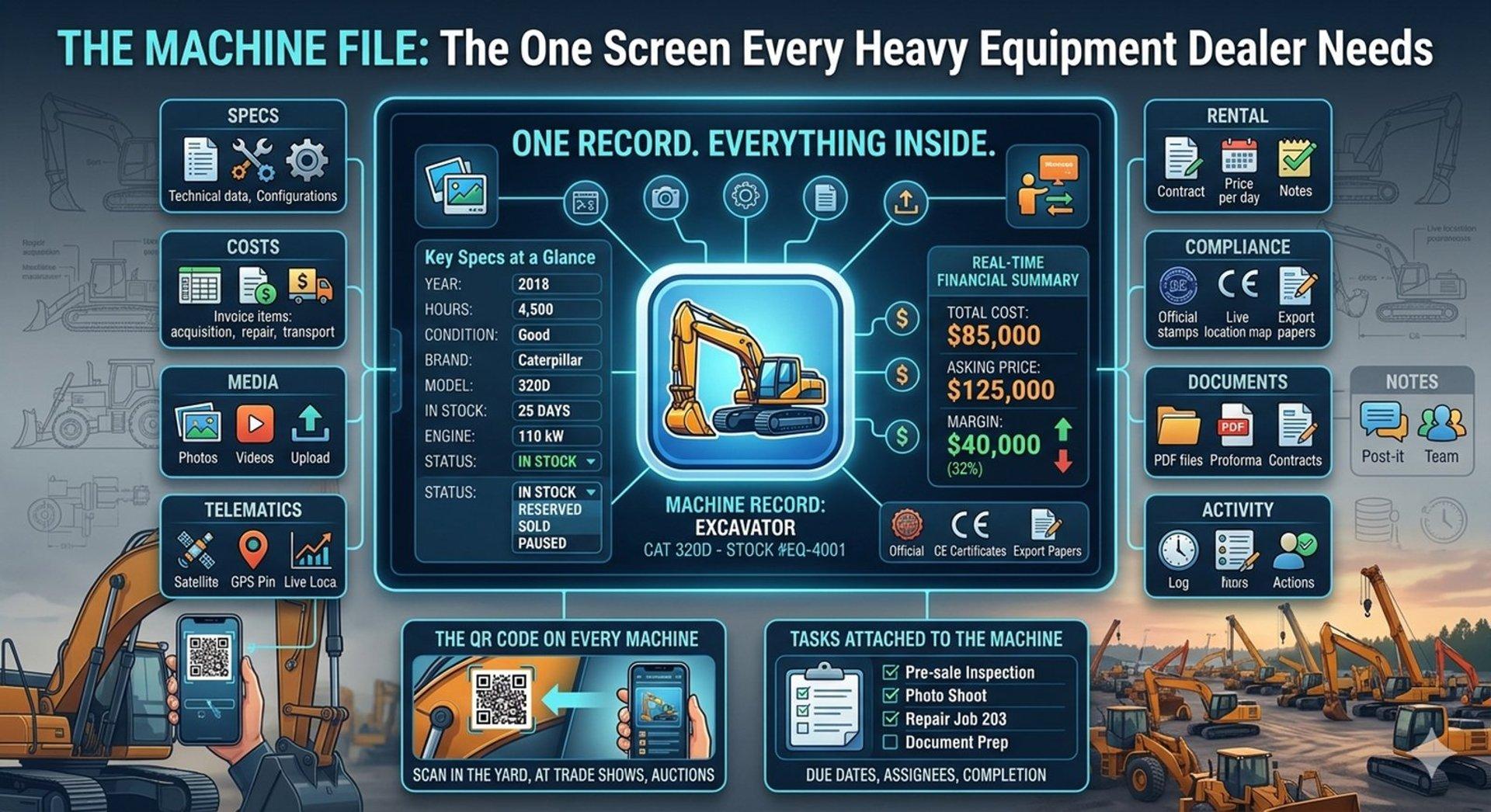
There's a question every machinery dealer has asked at least once — usually in the middle of a call with a buyer who's ready to move:
"Where is everything for this machine?"
The answer, for most dealerships, is: everywhere. Specs in the listing tool. Purchase cost in a spreadsheet. Repair invoices in an email folder. Photos in a shared drive. The service history in someone's head or a folder in the office. The buyer's previous enquiry somewhere in the inbox.
That fragmentation isn't a small inconvenience. It slows down every decision, creates room for errors, and makes it nearly impossible to know — quickly and confidently — whether a deal is actually worth taking.
The machine file solves this. Not as a concept, but as a practical, operational reality: one central record where everything about a machine lives, from the day it enters your stock to the day it leaves.
One Record. Everything Inside.
A proper machine file isn't just a data entry form. It's the operational home for everything that happens to that machine during its time in your inventory. Every decision, every cost, every contact, every document — attached to the machine, not scattered across your tools.
In practice, that means a single record that covers:
Key Specifications at a Glance
Before anything else, the machine file shows you what you need to know instantly: year, machine age, operating hours, condition, brand, model, how long it's been in stock, engine power, and current status. Not buried in a form — visible on the overview, available to anyone who opens the record.
When a buyer calls and asks about a specific excavator, the person who picks up the phone should be able to answer within seconds. Not after putting the caller on hold to find a spreadsheet.
Real-Time Financial Summary
This is where most dealerships have the biggest gap. A well-built machine file shows three numbers, always current:
- Total Cost — every expense recorded against this machine, summed automatically
- Asking Price — the current listed price
- Margin — both in currency and as a percentage
That margin figure isn't a calculation someone runs at the end of the month. It updates live as costs are added or prices change. When a buyer makes an offer below your asking price, you know in real time whether you have room to negotiate — or whether accepting that offer means selling at a loss.
Status and Workflow Controls
The machine's current status — In Stock, Reserved, Sold, Paused — is visible at a glance and changeable in one click. Supporting actions like creating a quote, marking as reserved, or pausing a listing are built into the same screen. When status changes, connected listings update automatically. No separate steps, no risk of forgetting to update a portal.
Team Ownership
Every machine file has a responsible person, a primary sales contact, and a secondary sales contact assigned. When an enquiry comes in, everyone knows who handles it. When a deal is being negotiated, accountability doesn't get lost between team members.
The Tabs: A Machine's Complete Life History
What separates a genuine machine file from a basic inventory record is depth. Each tab in a well-designed system covers a distinct part of the machine's operational history:
Specs — Full technical specifications. Not just make and model, but configuration details, attachments, component specifications — everything a serious buyer or inspector will ask about.
Costs — Itemised cost breakdown: acquisition price, transport, repairs, inspections, storage, marketing. Each line item is recorded as it happens, building the complete investment picture.
Media — All photos and videos for the machine, uploaded once and used everywhere: listings, quotes, export documents. No re-uploading when you need to send materials to a buyer.
Listing — Current marketplace distribution status. Which portals is this machine live on? At what price? What's the listing performance? Price and availability changes made here push to all connected channels automatically.
Rental — If the machine is available for rent or is currently on a rental contract, that's tracked here — separate from the sales workflow but attached to the same machine record.
Repairs — Every repair job: what was done, when, by whom, at what cost. This tab builds the maintenance record that buyers ask for and that directly affects machine value.
Fuel — Fuel consumption tracking for machines in use or on rental. Relevant for fleet operators and dealers managing active equipment.
Inspections — Pre-sale, post-purchase, and condition inspections — logged with findings, photos, and assessor notes.
Telematics — For machines with GPS or telematics devices, live location and usage data feeds directly into the machine file.
Compliance — Certificates, regulatory documents, and compliance records. Particularly important for export transactions and markets with strict equipment import requirements.
Service History — The full maintenance and service record, structured as a timeline. This is what buyers want to see before committing to a major purchase.
Documents — Every document generated for this machine: proforma invoices, sales contracts, customs declarations, delivery notes. All stored here, all accessible with the machine context intact.
Notes — Internal notes visible to the team. Observations from the yard, context from buyer conversations, anything that shouldn't go in a formal field but matters to know.
Activity — A complete log of everything that's happened on this record: status changes, edits, documents generated, enquiries received. A full audit trail, automatically maintained.
Multilingual from the Machine Record
For dealers with international buyers — which is most serious machinery traders — the machine file supports multi-language descriptions. A machine's listing description written in English is also available in Polish, German, or any other language relevant to your markets, all managed from the same record.
This matters for consistency. When the same machine description feeds your website, your portal listings, and your buyer quotes, everyone is reading the same information — not different versions that diverged because someone updated one place and forgot another.
The QR Code on Every Machine
One detail that closes the gap between the physical yard and the digital record: a QR code generated per machine.
Scan it from anywhere — the yard, a trade show, an auction lot — and you're taken directly to that machine's file. A buyer standing in front of the machine can pull up the full specification sheet. A mechanic doing an inspection can open the repairs tab and log their findings on the spot. An inventory manager doing a stock audit can check and update status without going back to the office.
The QR code makes the machine file accessible at the machine, not just at the desk.
Tasks Attached to the Machine
Workflow management lives on the machine record too. Tasks — pre-sale inspection, photo shoot, repair completion, document preparation — are created and tracked directly on the machine file. Due dates, assignees, and completion status are visible alongside everything else.
When a task is overdue, it's flagged on the machine record. Nothing gets lost in a separate task management tool that nobody connects back to the actual machine.
What This Changes in Practice
The operational shift that comes from running your dealership this way is harder to articulate than a feature list, so consider a specific situation:
A buyer from overseas contacts you about a used crawler excavator. They want to know: current hours, recent repairs, available export documentation, and your best price.
Without a machine file: that answer requires opening four different tools, chasing a colleague who did the last inspection, and hoping the spreadsheet with the cost breakdown is current.
With a machine file: you open one record. Hours are on the overview. Repairs are in the repairs tab. Documents are already stored. And the margin figure tells you exactly how much room you have on price before you start losing money.
The call takes ten minutes instead of two days of back-and-forth.
The Central Principle
A heavy equipment DMS can be evaluated many ways — features, integrations, pricing, support. But the most revealing test is simple: open a single machine record and see how much of your operation you can run from that one screen.
Specs. Costs. Margin. Media. Listings. Rental. Repairs. Fuel. Inspections. Telematics. Compliance. Service history. Documents. Notes. Full activity log. Team contacts. Tasks. Status controls. Quote generation.
If all of that is in one place — not linked to other modules, not requiring tab-switching across the system, genuinely unified on the machine record — you're looking at a system built around the right idea.
The machine is the centre of the business. The software should reflect that.